


Booking Software for Apartments
Rent out your apartments through your own website, with a calendar per apartment and availability that stays the same everywhere.
- check_circleNo commission per booking
- check_circleNo credit card required
- check_circleOnline within a day
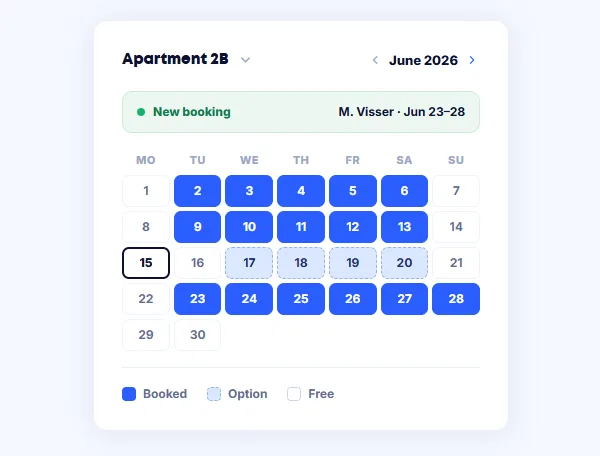
Every apartment its own calendar
When you rent out several apartments, the question is not whether something is free but which one is. A calendar per apartment answers that straight away, with its own rates per object and per season.
Bookings from platforms are imported alongside them, so an apartment booked elsewhere shows as taken on your own site immediately.
What you handle with Bookedin
The parts you use day to day, without separate tools around them.
Availability on your own site
Put your calendar on your website. Guests see what is free and book without a middleman.
A calendar per apartment
Every apartment gets its own rates, its own minimum stay and its own booking form.
Arrival without a front desk
Put your arrival times and instructions in the confirmation, so guests know how to get in.
Connected to the platforms
Exchange bookings with Airbnb, Booking.com and Micazu. Every reservation blocks the same nights on the other channels.
Paid at the booking
Guests pay by iDEAL, Bancontact or card. Deposits and part payments are handled in the same step.
A fixed amount per month
You pay a subscription, not a percentage of every booking. The revenue you earn stays yours.
Online in three steps
Create your calendar
Choose your type of rental, enter your rates and set your arrival and departure times. See create your first calendar.
Put it on your website
Paste a small piece of code onto your page. Works on your own site and on Wix, Squarespace or Webflow.
Connect your platforms
Import your existing bookings and export your calendar to the channels you are listed on. See importing bookings.
What changes when you switch
How it goes now
- closeWorking out availability per apartment
- closeDouble bookings between channels
- closeCommission on every reservation
- closePayment only on arrival
- closeEmailing instructions to every guest again
With Bookedin
- checkOne calendar that updates every channel
- checkBooked nights blocked everywhere
- checkBookings through your own site, commission-free
- checkPayment settled at the moment of booking
- checkConfirmation and practical details sent automatically
From two apartments to a whole building
Every plan includes two calendars. Rent out more apartments and you add calendars. See what that costs on the pricing page.
Frequently asked questions
You pay a fixed amount per month or per year, not a percentage of your bookings. Every plan includes two calendars; if you need more, you add them separately. Current amounts are on the pricing page, and you can try it free for fourteen days first.
Yes. You create a calendar per apartment, each with its own rates and conditions. Your dashboard shows the occupancy of every apartment side by side.
Yes. Per apartment you decide how many nights a booking lasts at a minimum, and on which days a stay may start.
No. You copy a small piece of code from your dashboard and paste it onto the page where the calendar should appear. It works on your own site and on Wix, Squarespace and Webflow. If you get stuck, support will take a look with you.
Usually the same day. Creating a calendar and putting it on your site takes minutes; most of the time goes into entering your rates and moving over existing bookings.
Any other questions? You can always email us at info@bookedin.nl.