


Reservation System for Holiday Homes
Take bookings and payments on your own website, keep your calendar level with Airbnb and Booking.com, and pay no commission per booking.
- check_circleNo commission per booking
- check_circleNo credit card required
- check_circleOnline within a day
One calendar where every booking lands
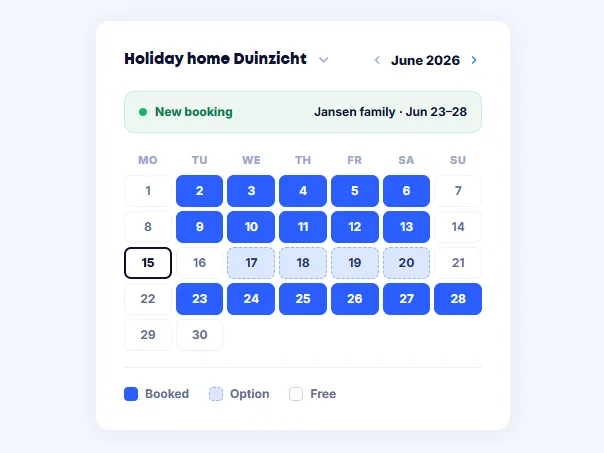
A reservation system keeps track of which dates are free, takes bookings and handles the payment. For a holiday home that means you rent through your own website while your listing sites stay in place. When a reservation comes in anywhere, those nights are blocked everywhere.
What you get back is a single place to manage your season, instead of one calendar per channel that you keep up to date by hand.
What you handle with Bookedin
The parts you use day to day, without separate tools around them.
Availability on your own site
Put your calendar on your website. Guests see what is free and book without a middleman.
Ask exactly what you need
Ask for arrival time, number of guests or whether a pet is coming along in your booking form. Every answer travels with the reservation.
Confirmations that go out by themselves
Your guest receives the confirmation and the practical details automatically, with your own arrival and departure times in it.
Connected to the platforms
Exchange bookings with Airbnb, Booking.com and Micazu. Every reservation blocks the same nights on the other channels.
Paid at the booking
Guests pay by iDEAL, Bancontact or card. Deposits and part payments are handled in the same step.
A fixed amount per month
You pay a subscription, not a percentage of every booking. The revenue you earn stays yours.
Online in three steps
Create your calendar
Choose your type of rental, enter your rates and set your arrival and departure times. See create your first calendar.
Put it on your website
Paste a small piece of code onto your page. Works on your own site and on Wix, Squarespace or Webflow.
Connect your platforms
Import your existing bookings and export your calendar to the channels you are listed on. See importing bookings.
What changes when you switch
How it goes now
- closeKeeping dates in several places
- closeBookings that overlap each other
- closeCommission on every reservation
- closeChasing part payments yourself
- closeRetyping arrival details for every guest
With Bookedin
- checkOne calendar that updates every channel
- checkBooked nights blocked everywhere
- checkBookings through your own site, commission-free
- checkPayment settled at the moment of booking
- checkConfirmation and practical details sent automatically
One holiday home or a portfolio: the same system
Every plan includes two calendars. Rent out more properties and you add calendars. See what that costs on the pricing page.
Frequently asked questions
You pay a fixed amount per month or per year, not a percentage of your bookings. Every plan includes two calendars; if you need more, you add them separately. Current amounts are on the pricing page, and you can try it free for fourteen days first.
Yes. Most owners use their own website alongside the platforms. You connect the calendars, after which a booking on one channel blocks those nights on the others. Anything that comes in through your own site is commission-free.
Yes. You block single days or whole weeks in your calendar. Those dates can no longer be booked on any connected channel, so you can simply use the property yourself.
No. You copy a small piece of code from your dashboard and paste it onto the page where the calendar should appear. It works on your own site and on Wix, Squarespace and Webflow. If you get stuck, support will take a look with you.
Usually the same day. Creating a calendar and putting it on your site takes minutes; most of the time goes into entering your rates and moving over existing bookings.
Any other questions? You can always email us at info@bookedin.nl.