


Reservation System for Canoes
Let customers reserve canoes per time slot on your own website, with a quantity per type and payment in advance.
- check_circleNo commission per booking
- check_circleNo credit card required
- check_circleOnline within a day
Keeping track of numbers per time slot
Canoe rental is about numbers: four singles, six doubles, and on a sunny Saturday everything goes out. What you need is a calendar that tracks how many canoes are left per time slot.
Customers reserve in advance on your own website and pay straight away, so you know how many canoes have to be ready at each moment.
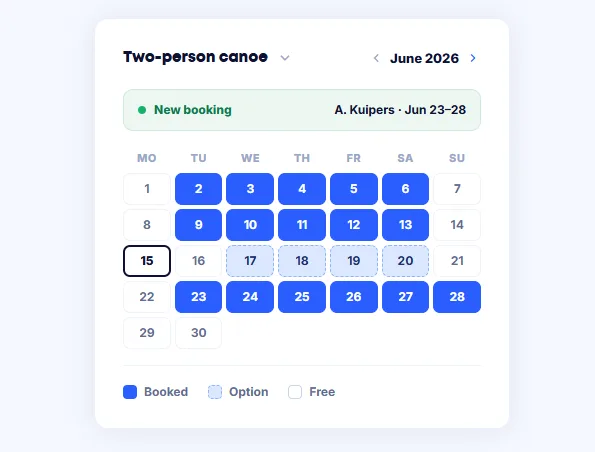
What you handle with Bookedin
The parts you use day to day, without separate tools around them.
Availability on your own site
Put your calendar on your website. Customers see which days are free and book without calling.
A calendar per type of canoe
Single, double or family canoe: every type gets its own rates and its own quantity.
Time slots with a maximum
Set start times and state how many canoes are available per slot.
Paid at the booking
Customers pay by iDEAL, Bancontact or card. Rental price and deposit go in the same step.
A fixed amount per month
You pay a subscription, not a percentage of every booking. The revenue you earn stays yours.
Confirmations that go out by themselves
Your customer receives the confirmation with pick-up time, location and terms automatically.
Online in three steps
Create a calendar per vehicle
Enter your rates and decide whether you rent by the day or by the half day. See create your first calendar.
Put the calendar on your website
Paste a small piece of code onto your page. Works on your own site and on Wix, Squarespace or Webflow.
Ask for what you need
Switch on the fields that help at handover, from identification to pick-up time. See adding custom fields.
What changes when you switch
How it goes now
- closeReservations on a notepad
- closeMore canoes booked than you own
- closePayment only at pick-up
- closeNo view of the rush per half day
- closeA phone that keeps ringing on sunny days
With Bookedin
- checkOne calendar per item showing free and booked days
- checkDouble bookings ruled out
- checkBookings through your own site, commission-free
- checkPayment and deposit settled at the booking
- checkThe renter’s details complete in one place
From ten canoes to a whole fleet
Every plan includes two calendars. Rent out more types and you add calendars. See what that costs on the pricing page.
Frequently asked questions
You pay a fixed amount per month or per year, not a percentage of your bookings. Every plan includes two calendars; if you need more, you add them separately. Current amounts are on the pricing page, and you can try it free for fourteen days first.
Yes. You state how many you own per type of canoe. Once they are all booked for a slot, that type is no longer available for that moment.
Yes. You set start times and a duration, so customers pick a moment instead of a whole day.
No. You copy a small piece of code from your dashboard and paste it onto the page where the calendar should appear. It works on your own site and on Wix, Squarespace and Webflow. If you get stuck, support will take a look with you.
Usually the same day. Creating a calendar and putting it on your site takes minutes; most of the time goes into entering your rates.
Any other questions? You can always email us at info@bookedin.nl.