


Adding bulk selection prices in Bookedin
With the Bulk selection prices feature, you can set prices for multiple days or an entire period at once. This saves a lot of time and is ideal for seasonal rates, holiday periods, or recurring weekends.
Log in to your account
Go to https://app.bookedin.nl/login/ and log in with your credentials. You will arrive directly at your dashboard.
Check if you have a calendar
- checkAlready created a calendar? → Proceed to step 3.
- checkNo calendar yet? → Follow the guide "Make your first calendar" first.
Open the Pricing and Services page
In the menu, click on Plugins → Pricing and Services.
- checkNote: If you haven't created any prices yet, please refer to the guide "Creating prices" first.
Choose a start and end date
Enter the period for which you want to perform a bulk selection:
- checkSelect a start date.
- checkSelect an end date. The bulk selection will only apply to this specific period.
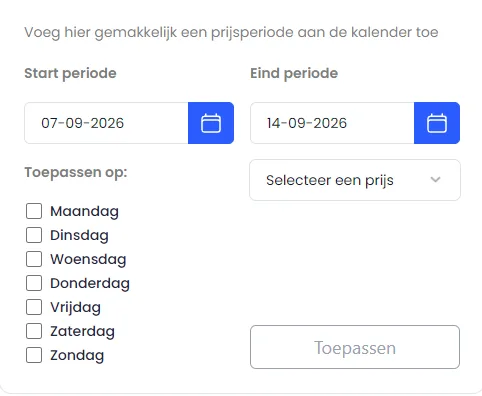
Select the days the price applies to
Under the heading "Apply to", you can indicate which days of the week you want to set the price for (for example, only Friday through Sunday or Monday through Friday).
Choose a price
Select one of the prices you created earlier, for example:
- checkWeekend price
- checkHigh season rate
- checkMidweek rate
Click Apply
Press the blue "Apply" button.
The selected price will now be automatically applied to all chosen days within the selected period.
All set! You have successfully added bulk selection prices.
The calendar is automatically updated and will immediately display the correct rates.