


Manually adding a booking in Bookedin
In addition to automatic bookings via the booking form, Bookedin also allows you to manually add a reservation. This is useful when you receive an inquiry via telephone, email, or another platform.
1
Log in to your account
Go to https://app.bookedin.nl/login/ and log in with your credentials. After logging in, you will see the dashboard.
2
Check if you have a calendar
- checkAlready created a calendar? → Proceed to step 3.
- checkNo calendar yet? → Follow the guide "Make your first calendar" first.
3
Location of the "New Booking" button
There are two ways to manually add a booking:
- checkVia the Calendar page → Click the blue button "New Booking".
- checkVia the Bookings page → Also click the blue button "New Booking". In both cases, you will be directed to Bookings > Create.
4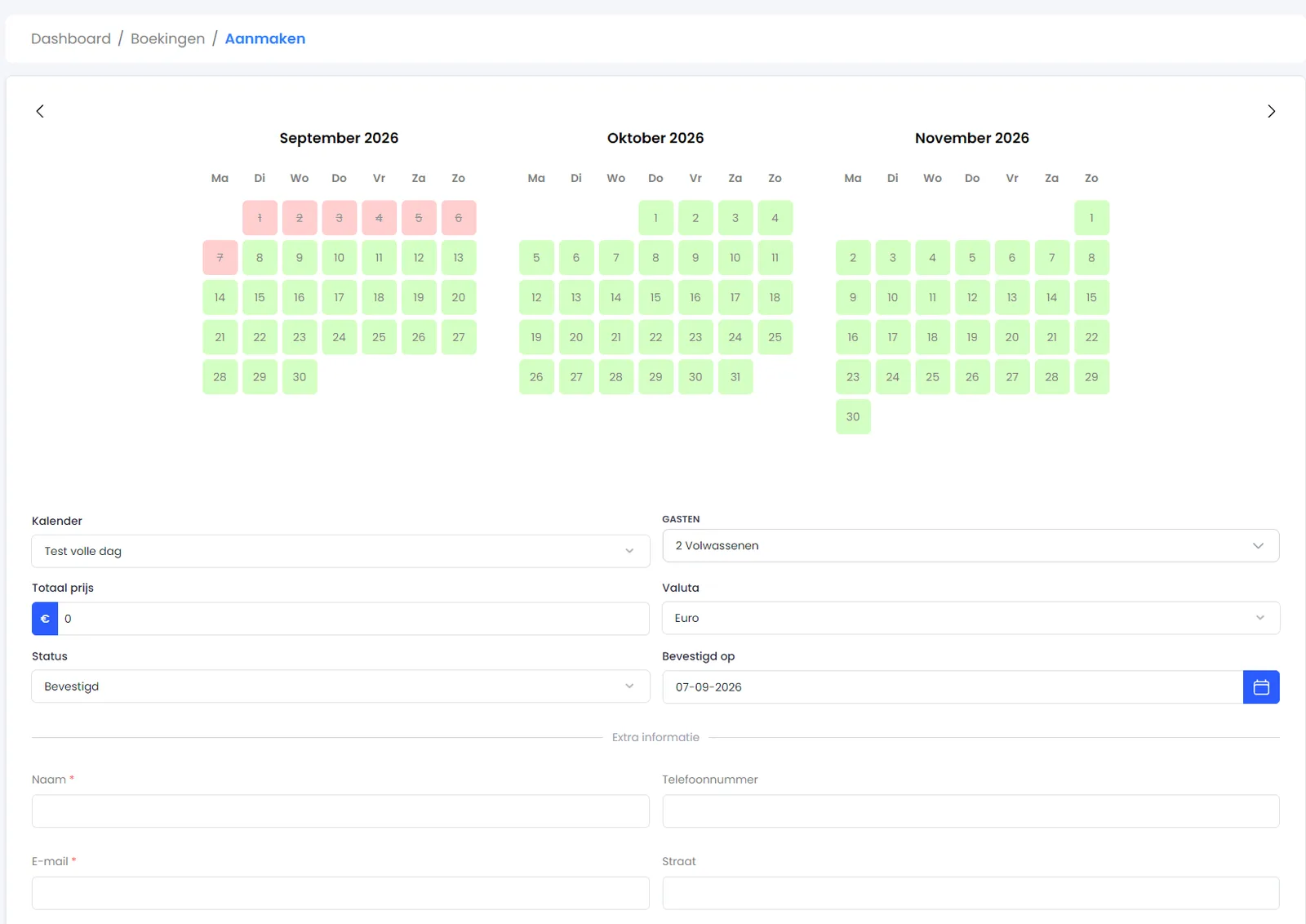
Overview of fields
On the Bookings > Create page, you will see an overview of all the fields that need to be filled in.
- checkPlease note: These fields may vary per calendar, depending on your booking form settings.
5
Fill in the fields
Enter the following information:
- checkCalendar → Select the calendar for which you want to add the booking.
- checkNumber of people → Indicate the number of guests for this reservation.
- checkStay dates → Select the check-in and check-out dates.
- checkTotal price → Enter the total amount for the booking.
- checkCurrency → Select the correct currency (e.g., EUR).
- checkStatus → Choose the booking status (e.g., Confirmed, Option, Personal use).
- checkConfirmed on → Enter the date of confirmation (if applicable).
- checkExtra information → Custom fields generated in Bookedin (which may have been manually adjusted).
6
Save
Click the blue button "Save".
The booking will now be added to your calendar.
check_circle
All set! The manual booking is now visible in your calendar. Other renters will no longer be able to reserve these dates.
Was this guide helpful?
Ask support a question