


Filling in personal details in Bookedin
By entering your personal details, you ensure that your account is fully set up and that all communications and bookings are correctly linked to you as a user.
1
Log in to your account
Go to https://app.bookedin.nl/login/ and log in with your email address and password. After logging in, you will arrive at your dashboard.
2
Open your profile settings
- checkIn the top right corner of your screen, click on your profile name.
- checkSelect the Profile option (located between Profile and Logout).
3
Navigate to your personal details
You will now be on your profile page.
- checkScroll down the page to reach the Personal Details section.
4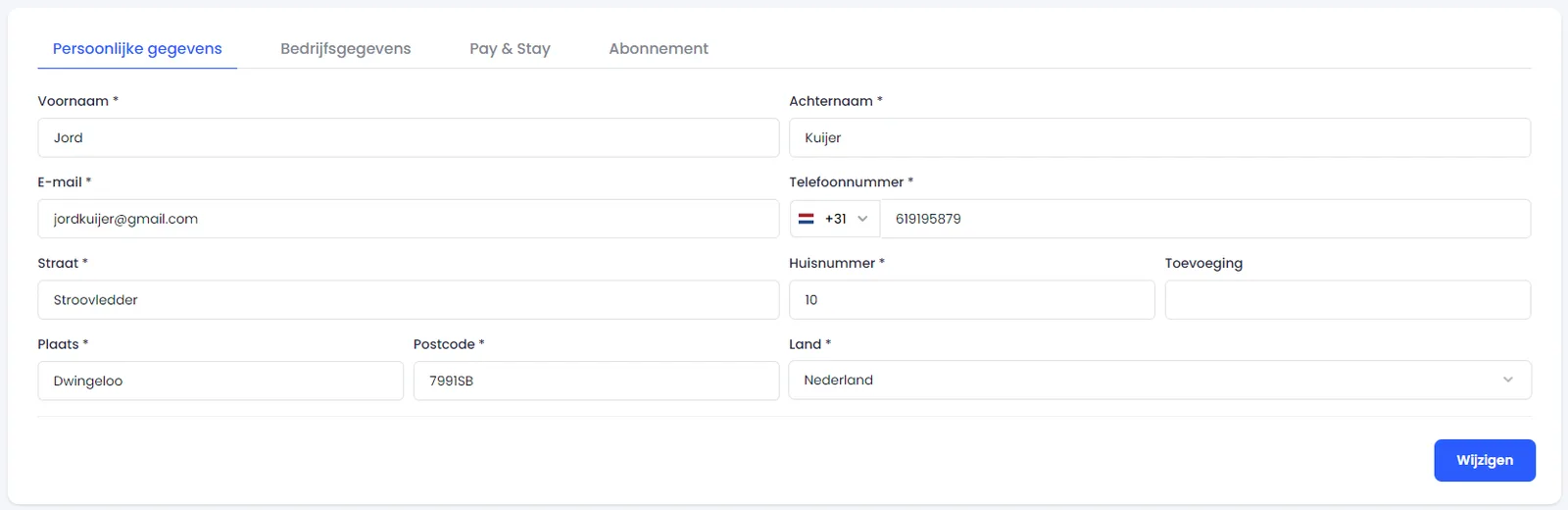
Enter your personal details
Fill in the following information in the fields provided:
- checkFirst name
- checkLast name
- checkEmail address
- checkPhone number
- checkStreet
- checkHouse number
- checkCity
- checkPostal code
- checkCountry
5
Save your details
- checkClick the blue Change (or Save) button at the bottom.
check_circle
All set! Your personal details have now been saved and are linked to your Bookedin account.
Was this guide helpful?
Ask support a question